• Skip to primary navigation
  • Skip to main content
  • Skip to footer
Corel Discovery Center
Login
  • Home
    • Photo Home
    • Video Home
    • Graphics Home
    • Painting Home
  • Tutorials
    • Photo Tutorials
    • Video Tutorials
    • Graphics Tutorials
    • Painting Tutorials
    • WordPerfect Office Tutorials
    • Q & A Series
    • Projects
    • Tips
  • Free Stuff
    • Freebies
    • Free Trials
  • Contests
  • Support
  • Community
    • Blog
    • User Galleries
  • Home
    • Photo Home
    • Video Home
    • Graphics Home
    • Painting Home
  • Tutorials
    • Photo Tutorials
    • Video Tutorials
    • Graphics Tutorials
    • Painting Tutorials
    • WordPerfect Office Tutorials
    • Q & A Series
    • Projects
    • Tips
  • Free Stuff
    • Freebies
    • Free Trials
  • Contests
  • Support
  • Community
    • Blog
    • User Galleries
  • Home
  • Tips
  • Digital Art
  • Optimizing bristle brush performance

Optimizing bristle brush performance
Painter_Tip_35

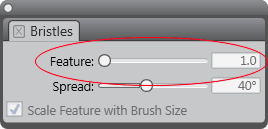
You can improve the performance of bristle brushes by increasing the Feature setting. To increase the Feature setting, choose Window > Brush Control Panels > Bristles and adjust the Feature slider.

Preserving brush changes
Versioning documents

RELATED TIPS

Creating New Brush Libraries

Read more
Read more

Optimizing brush performance on Multicore systems

Read more
Read more

Customizing icons for custom palettes

Read more
Read more

Using a keyboard shortcut to quickly access brush controls

Read more
Read more

Controlling the intensity of brushstrokes

Read more
Read more

Improving brush performance with spacing

Read more
Read more

Form a Good Foundation

Read more
Read more

Pick a Simple Brush to Get Started!

Read more
Read more

Color Your Sketch Smartly

Read more
Read more

Have Fun with Colors!

Read more
Read more


Featured Products

Get in Touch!

Footer

  • AfterShot Pro
  • CorelDRAW Graphics Suite
  • Painter
  • PaintShop Pro
  • PhotoMirage
  • Pinnacle Studio
  • VideoStudio
  • WordPerfect
  • Experts
  • Freebies
  • Tips
  • About us
  • Provide feedback
  • Latest on the blog

Free Trials

Don’t have the software or want to try something new? Try the software for 30 days at no cost or commitment.
Get started for FREE

Corel Discovery Center
© Copyright © 2026 Corel Corporation. All rights reserved.
  • Terms of Use
  • Privacy
  • Cookies